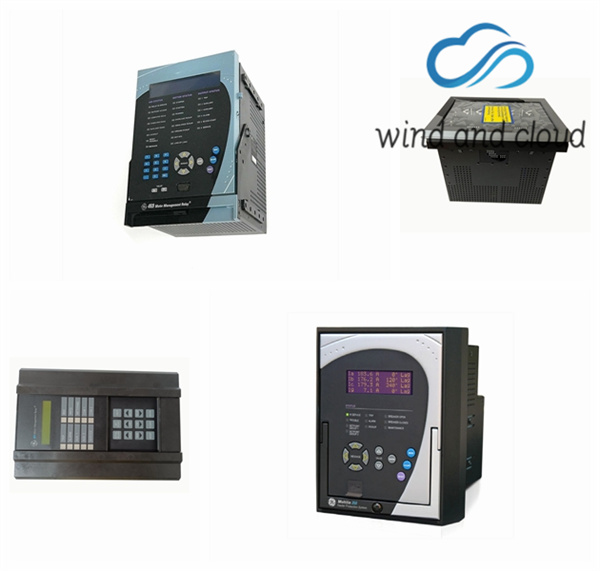
104X905BA603 GE Multilin motor protection management device
$ 93.25
All messages are displayed on a 40-character LCD display to make them visible under poor lighting conditions and from various viewing angles. Messages are displayed in plain English and do not require the aid of an instruction manual for deciphering. While the keypad and display are not actively being used, the display will default to user defined status messages. Any trip, alarm, or start inhibit will automatically override the default messages and appear on the display There are ten LED indicators, as follows: • TRIP: Trip relay has operated (energized) • ALARM: Alarm relay has operated (energized) • AUX 1: Auxiliary relay has operated (energized) • AUX 2: Auxiliary relay has operated (energized) • SERVICE: Relay in need of technical service. • STOPPED: Motor is in the Stopped condition • STARTING: Motor is in the Starting condition • RUNNING: Motor is in the Running condition • OVERLOAD: Motor is in the Overload condition • LOCKOUT: Motor is in the Lockout condition RS232 Program Port This port is intended for connection to a portable PC. Setpoint files may be created at any location and downloaded through this port using the EnerVista 369 Setup software. Local interrogation of Setpoints and Actual Values is also possible. New firmware may be downloaded to the 369 Relay flash memory through this port. Upgrading of the relay firmware does not require a hardware EPROM change. Keypad The 369 Relay messages are organized into pages under the main headings, Setpoints and Actual Values. The [SETPOINTS] key is used to navigate through the page headers of the programmable parameters. The [ACTUAL VALUES] key is used to navigate through the page headers of the measured parameters. Each page is broken down further into logical subgroups of messages. The [PAGE] up and down keys may be used to navigate through the subgroups. • [SETPOINTS]: This key may be used to navigate through the page headers of the programmable parameters. Alternately, one can press this key followed by using the Page Up / Page Down keys. • [ACTUAL VALUES]: This key is used to navigate through the page headers of the measured parameters. Alternately, one can scroll through the pages by pressing the Actual Values key followed by using the Page Up / Page Down keys. The prices of all products of Zhangzhou Fengyun may fluctuate at any time. The specific price is subject to the customer service quotation. Please confirm the model, product, price and other details with the customer service before placing the order. Second-hand and brand-new products are sold in the store. Please contact the customer service for details. Recommended GE related models: 269PLUS-100P-HI 269PLUS-10C-120 269PLUS-10C-120VAC 269PLUS-10C-48VDC 269PLUS-10C-HI 269PLUS-120N-120 269PLUS-120N-125VDC 269PLUS-120N-HI 269PLUS-DO-100N-120 269PLUS-DO-100P-120 269PLUS-DO-100P-125VDC 269PLUS-DO-120N-120 269PLUS-DO-120N-125VDC 269PLUS-DO-211-100N-120VAC 269PLUS-DO-211-100P-120VAC 269PLUS-DO-211-120N-120VAC 269PLUS-DO-212-10C-120 269PLUS-DO-225-100P-HI-125VDC 269PLUS-DO-271-100P-120 269PLUS-DO-311-100P-HI 269PLUS-DO-315-100P-HI 269PLUS-W-100P-120 269PLUS-W-100P-120VAC 296PLUS-DO-100P-120 323A2374P3 350-E-P0-G0-HEENN-SN-NN 350-E-P1-G1-HECM-3E-DH 350-E-P1-G1-HEMCN-3E-DN 350-E-P5-G5-HESNN-1E-DN 350-E-P5-G5-HESNN-SN-DN 350-E-P5-G5-LESNN-SN-DN 350-E-P5-S5-HESNP-1E-NH 369-HI-0-0-0-0 369-HI-0-B-0-0-0-0 369-HI-0-BFD-0-E 369-HI-0-M-0-0 369-HI-0-M-0-0-E 369-HI-0-MFE-0 369-HI-BM-0-0 369-HI-R-0-0-0 369-HI-R-0-0-0-0 369-HI-R-0-0-0-0-0 369-HI-R-0-0-0-0-E 369-HI-R-0-F-0-0-E 369-HI-RB-0-0 369-HI-RB-0-E-0-E 369-HI-RM-0-0 369-HI-RM-0-0-0 369-HI-RM-0-0-0-E 369-Hi-RM-0-0-H-0 369-HI-RM-0-0-HE 369-HI-RMF-0-HE 369-HI-RMFPHE 369-LO-0-MFE-0 369-LO-RM-0-D-0-E 469-P1-H1-A1-E 469-P1-HI-A1-EH 469-P5-HI-A1-E 469-P5-HI-A20 469-P5-HI-A20-E 469-P5-HI-A20-EH 469-P5-HI-A20-H 469-P5-HI-A20-T 469-P5-LO-A20 469-P5-LO-A20-E 469-P5-LO-A20-T 489-P1-LO-A20 489-P1-LO-A20-E 489-P5-HI-A20 489-P5-HI-A20-E 489-P5-HI-A20-EH 489-P5-HI-A20-T 489-P5-HI-A20-TH 489-P5-LO-A20 489-P5-LO-A20-E Show More Show Less